Shred the Secrets Roblox Guide
Learn the official Shred the Secrets Roblox loop: grab documents, vacuum scraps, shred for cash, upgrade the Skill Tree, clear each room, and go home.
- 01Collect
- 02Vacuum
- 03Shred
- 04Earn
- 05Upgrade
- 06Clear
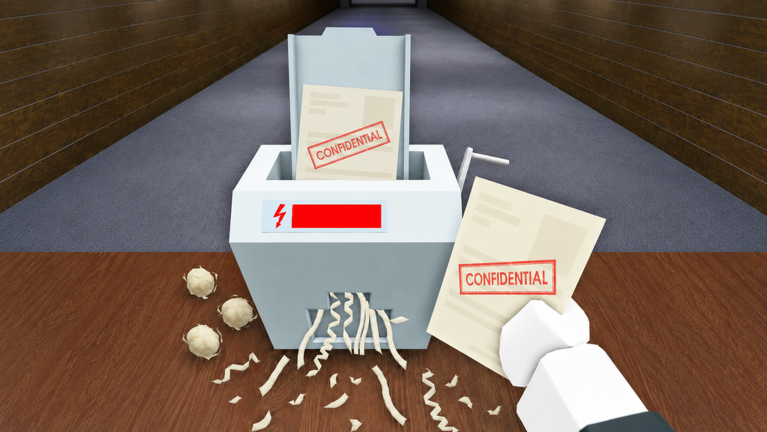
Shred the Secrets is a Roblox simulation experience by CRAZY BRAZILIAN. The premise is simple: your boss wants evidence removed, so you grab documents, vacuum scraps, shred the paper for cash, upgrade the Skill Tree, clear the room, and go home. That six-step sequence comes from the official Roblox experience description.
This independent guide explains that verified loop without inventing controls, prices, room counts, or an “optimal” route. Use this page as the game hub. When you want a longer walkthrough, open the step-by-step beginner guide.
What is Shred the Secrets?
Shred the Secrets turns office cleanup into a progression loop. Documents are the starting objective. Collecting them leaves scraps that need to be vacuumed. The recovered material is then shredded for cash. Cash supports skill upgrades, upgrades help with later work, and the run continues until the room is clear and the game sends you home.
The official listing establishes the broad sequence, the creator name, and the experience identity. It does not publish the current controls, the price of each skill, the number of rooms, reward multipliers, or a best upgrade order. Those details can change and should be read from the live game.
The site records the official identity with Place ID 113175013158657 and Universe ID 10505651236. Those IDs help distinguish the real experience from similarly named pages or copied media. The Play on Roblox button on this page links to that verified place.
Latest verified game facts
The public Roblox badge feed listed 30 enabled badges when checked on August 5, 2026. The list confirms Ending 1, Ending 2, and Ending 3. It also names a fake exit, a key in Room 3, the Golden Shredder, a basement elevator, and the Mad Scientist Quest.
Three late-July badges are especially easy for older guides to miss: THE CAKE IS A LIE, Whistleblower (Ending 3), and Industrial Revolution. The last of those requires the Mad Scientist Quest. The official records confirm these objectives, but they do not publish every location or route.
Use the badges, endings and secrets guide for the full 30-item checklist, source date, and a clear line between confirmed requirements and unverified solutions.
Official gameplay loop
The official description gives players six clear jobs:
- Grab the documents. Start with the papers the room presents as objectives. Use the live interaction prompt rather than guessing a control from an older video.
- Vacuum up the scraps. Loose paper remains a separate part of the cleanup. Recheck the floor and nearby work areas after collecting documents.
- Shred them for cash. Take the collected material through the game’s shredding step. Cash is the visible reward that confirms the action registered.
- Upgrade the Skill Tree. Read the current skill name, effect, and cost in the live menu before spending. This site does not publish an unsupported “best build.”
- Clear the room. Check for documents, paper scraps, active prompts, and any unfinished interaction before assuming the room is complete.
- Go home. Follow the completion direction shown by the game. Do not substitute a remembered exit from a different room or version.
This loop is more useful than a memorized speed route because it answers the first question to ask when progress stops: which step has not registered yet?
Quick start for a first run
Begin by looking over the whole room before buying anything. Identify visible documents and note where the shredder, exit, or other obvious interaction points appear. You do not need to memorize the layout. You only need enough orientation to avoid carrying paper past the place where it should be processed.
Collect documents until the current search area no longer shows an obvious paper objective. Then look down and around the cleared surfaces for scraps. Vacuuming is not decorative cleanup; the official listing names it as its own step. If progress does not advance after collecting a stack, unfinished scraps are one of the first things worth checking.
After the cleanup step, complete the live shredding interaction and watch for cash feedback. Treat the reward as confirmation, not as proof that every object in the room has been handled. Scan again before spending. A new prompt, an open area, or another visible document can tell you more than the size of a single payout.
Open the skills menu only when you can read the current effect and cost. Upgrade descriptions in the live game are more reliable than a dated recommendation. On a first run, understanding what a purchase changes matters more than forcing a particular build.
Before leaving, repeat the loop as a checklist: documents, scraps, shredder, cash, skills, room clear, home. The list is short enough to use without pausing the game for a long article.
What cash and skills mean
Cash connects one cleanup pass to the next. The official description confirms that shredding produces cash and that skills can be upgraded. It does not establish exact earnings or costs, so this page does not print numbers that may become stale.
When choosing a skill, compare the wording in the current menu with the part of the loop that slows you down. A skill may affect carrying, cleaning, shredding, movement, or another live system, but its exact effect should be confirmed in the game before you spend. If a label is unclear, keep the cash until the choice makes sense.
This approach also makes update changes easier to notice. If a cost, description, or effect differs from a video, the current interface wins. The video remains useful for seeing movement and object flow, while the game remains the source for current values.
How to tell whether a room is clear
A room is not clear merely because cash appeared once. Check the job sequence instead:
- Are any documents still visible or reachable?
- Are paper scraps left on the floor or around emptied surfaces?
- Are you still carrying material that needs to be shredded?
- Does an interaction prompt remain active?
- Has the game shown a room-complete or go-home direction?
If one answer points to unfinished work, return to that step. If nothing looks actionable, widen the camera view, walk the room perimeter, and revisit the current prompt. The full guide includes a longer stuck-room checklist.
Focused guides
- Documents, scraps and the shredder explains the three paper states and how to find the first action that did not register.
- Cash, skills and progression covers purchase decisions without presenting unsupported prices or a fixed tier list.
- Clear the room and go home provides a final sweep, completion checks, and exit troubleshooting.
- Badges, endings and secrets lists all 30 enabled badges, the three confirmed endings, and the newest quest clues.
Videos and source limits
The VendoPlus video on this page is a visual operation reference. The Ricoko Tutorial & Showcase video is a community strategy reference. Both can show what a run looked like when recorded, but neither sets current prices, guaranteed routes, or permanent room layouts.
The player loads only after you choose it. The preview identifies the video and channel, and a direct YouTube link remains available without JavaScript. Detailed sourcing and correction rules are collected once in the Editorial Policy rather than repeated throughout every gameplay section.
Shred the Secrets FAQ
What do you do in Shred the Secrets?
You grab documents, vacuum the paper scraps, shred the material for cash, upgrade your skills, clear the room, and go home. That order is published in the official Roblox description.
Why is the room not finishing?
Check which official step remains incomplete. Look for an uncollected document, scraps that still need vacuuming, carried material that has not been shredded, or a live prompt elsewhere in the room.
What is cash used for?
The official description connects cash with skill upgrades. Exact costs, income values, and the best purchase order should be checked in the current game.
What is the best skill upgrade?
There is no verified universal answer on this site. Read the current effects and costs, then choose an upgrade that addresses the part of your run that is visibly slowing you down.
Are the YouTube routes official?
No. They are public community examples. Use them to recognize objects and the broad flow, then confirm the live prompts, values, and room state in your own session.
Where can I find a complete walkthrough?
Use the How to Play Shred the Secrets guide for a six-step walkthrough, first-run routine, and troubleshooting table.
Video references

How to Play Shred The Secrets Roblox Full Guide
By VendoPlus. VendoPlus gameplay video, used only as visual operation reference.
Loads youtube-nocookie only after activation.

Shred the Secrets Roblox Fast way to Win
By Ricoko Tutorial & Showcase. Ricoko community strategy video; it does not prove fastest routes or current values.
Loads youtube-nocookie only after activation.